


Swegltek USB4 USB-C Cable | 80Gbps, 240W | Dual-End Screw Lock | 0.5–1m
USB4 speed with screw-secured connections
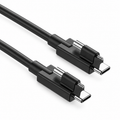
The Swegltek USB4 USB-C to USB-C Passive Cable combines data transfer up to 80Gbps with USB Power Delivery up to 240W. Straight USB-C male connectors at both ends each include one fixing screw for equipment with matching threaded mounts.
Key features
- Data up to 80Gbps: designed for compatible USB4 equipment. Actual throughput depends on both devices and the workload.
- Power up to 240W: maximum supported USB PD rating of 48V/5A. Requires a compatible power source, receiving device and negotiated power profile.
- One screw at each end: secure the plugs to compatible equipment. Match the screw position and thread before installation.
- Passive copper construction: coaxial cable structure with shielding for signal integrity and a black PVC jacket.
- Two practical lengths: choose 0.5m for nearby equipment or 1m for additional routing room.
Built for compatible USB-C workspaces
Connect compatible hosts, docks or storage equipment where a short cable and screw-mounted plugs suit the installation. Confirm that the ports provide the required USB4 data and USB PD capabilities. The connector shape alone does not establish feature support.
Specifications
| Item | Specification |
|---|---|
| Brand | Swegltek |
| Cable type | USB4 passive copper cable |
| Connectors | USB-C male to USB-C male; straight housings |
| Locking | One fixing screw on each end; matching equipment mounts required |
| Maximum data rate | 80Gbps; actual performance is equipment dependent |
| Maximum power rating | USB PD up to 240W (48V/5A), with compatible equipment |
| Construction | Coaxial copper structure with shielding |
| Jacket / color | PVC / black |
| Available lengths | 0.5m and 1m |
Installation
- Check port clearance and matching screw mounts on both devices.
- Seat the USB-C plugs fully before tightening. Keep tension off the connectors.
- Secure gently using the equipment's installation guidance. Do not force incompatible threads.
- Test the required data and power operation before completing the setup.
Frequently asked questions
Is this an optical cable?
No. This model uses passive copper construction.
Do both ends have a screw?
Yes. Each straight USB-C plug has one fixing screw.
Will it always deliver 240W?
No. 240W is the maximum supported rating. Actual delivery depends on the power source, device and negotiated USB PD profile.
Does every USB-C device support 80Gbps?
No. Both connected devices must support the required USB4 mode. A slower device will limit the connection.
$28.80
In StockFree Shipping Over $49
30-Day Return
2-Year Warranty
24/7 Support
Product Details
Everything you need to know about this product.
Extend USB-C Video to a DisplayPort Display
The swegltek SCTD-1200 USB-C to DisplayPort active optical cable connects a compatible USB-C video
source to a DisplayPort monitor, projector or professional display. Its integrated cable design provides a
direct display connection for equipment layouts that need more distance between the source and screen.
4K Video at 60Hz
Support for video up to 4K at 60Hz makes this USB-C to DP cable suitable for clear presentations, digital
signage and professional visual content. The supported resolution and refresh rate depend on the source,
display and complete system configuration.
DisplayPort 1.2 Optical Transmission
With DisplayPort 1.2 support and link bandwidth up to 21.6Gbps, this active optical cable uses fiber for
high-speed signal transmission along the cable run. The bandwidth rating describes the DisplayPort link;
this product is intended for display connectivity.
Length Options from 5m to 50m
Choose a 5m, 7.5m, 10m, 15m, 20m, 25m, 30m, 35m, 40m, 45m or 50m USB-C to DisplayPort cable to suit
the installation route. Allow for cable routing, connector access and equipment position when selecting
your length. Contact swegltek for project quantities or other length requirements within the 5–50m range.
Designed for Professional Display Installations
Conference rooms: connect compatible USB-C presentation sources to DisplayPort displays.
Digital signage: place compatible media source equipment farther from the screen.
Workstations: position the computer away from the display area.
AV installations: plan longer point-to-point video and audio cable routes to compatible DP equipment.
Check Your USB-C Video Output
Connect the USB-C end to a source that supports DisplayPort Alt Mode and the DisplayPort end to the
display input. A USB-C connector alone does not guarantee video output. Confirm source and display
compatibility, installation direction and power requirements before ordering.
Product Specifications
Technical specifications and product details.
| Model | SCTD-1200 |
|---|---|
| SCTD-1200Product type | USB-C to DisplayPort Active Optical Cable |
| Connectors | USB-C Male to DisplayPort Male |
| DisplayPort standard | DP 1.2 |
| Link bandwidth | Up to 21.6Gbps |
| Video | Up to 4K at 60Hz |
| Length range | 5–50m |
| 5–50mSignal source | USB-C with DisplayPort Alt Mode |
| Destination | Compatible DisplayPort display input |
FAQS
Find answers to the most common questions about our products, shipping, returns and support.
No. Its plug projects at 90° to the housing and cable axis, as shown.
Check the device interface, port recess, nearby connectors and required cable exit direction.
This listing describes USB data connectivity. USB-C video output and high-wattage laptop charging are not specified.
One cable in the selected length. Devices shown are for illustration.
Standard options cover 5m to 50m. Contact swegltek with your installation route and required length for other project options.


